Prerequisites:
Vuejs: 3.0.0
Ionic: 5.4.0
Install ionic Ionic Vue Quickstart – Ionic Documentation (ionicframework.com)
Create 4 components:
Profile
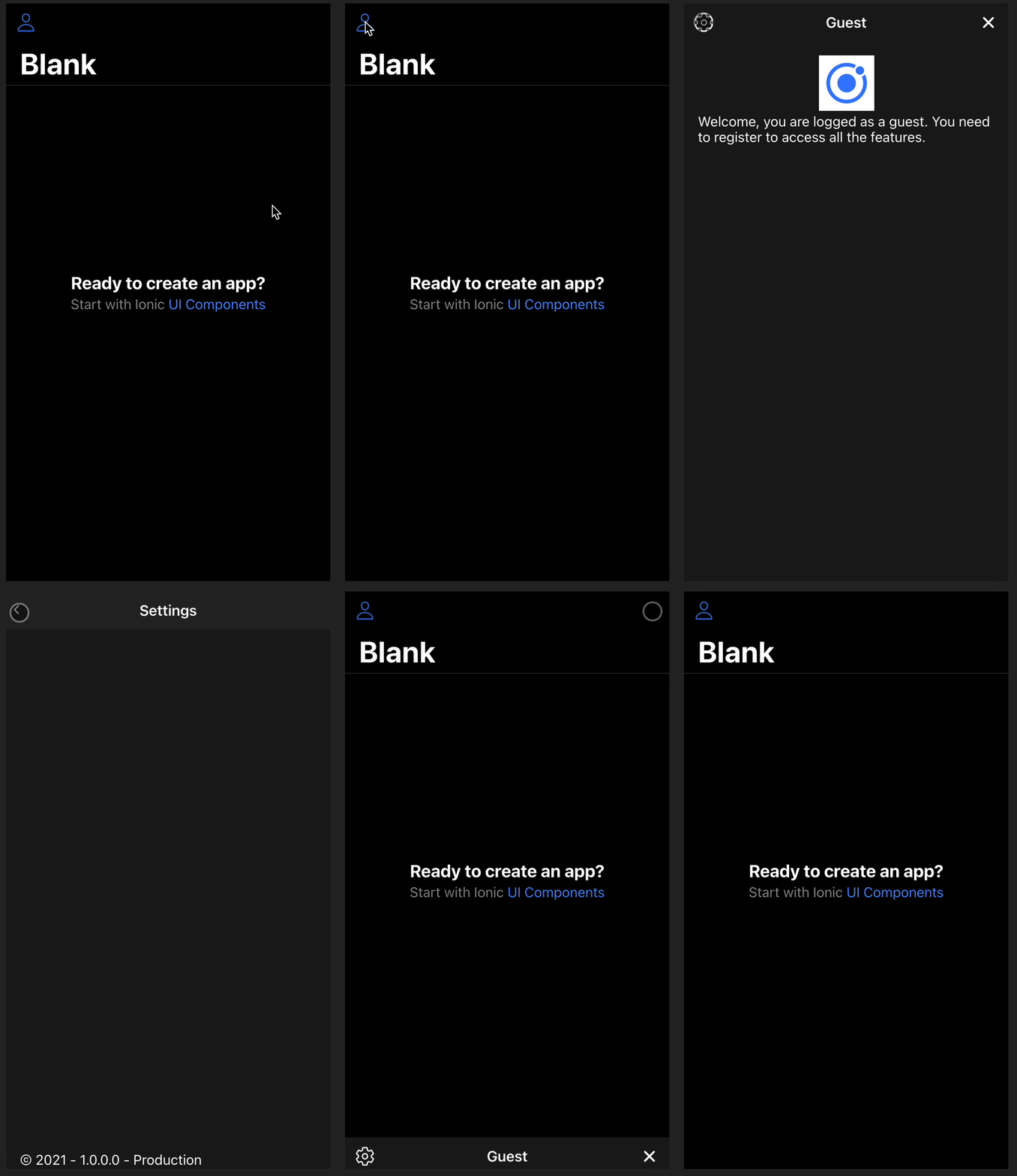
Used to open and close the modal.
<template>
  <ion-buttons slot="start">
    <ion-button @click="setOpen(true)">
      <ion-icon :icon="personOutline" h="40" w="40" />
    </ion-button>
  </ion-buttons>
  <ion-modal :is-open="isOpenRef" @onDidDismiss="setOpen(false)">
    <ProfileModal :rootPage="ProfileDetail"></ProfileModal>
  </ion-modal>
</template>
<script lang="ts">
import { IonModal, IonButton, IonIcon, IonButtons } from "@ionic/vue";
import { personOutline } from "ionicons/icons";

import { defineComponent, ref } from "vue";
import ProfileModal from "@/components/profile/ProfileModal.vue";
import ProfileDetail from "@/components/profile/ProfileDetail.vue";

export default defineComponent({
  name: "Profile",
  components: { IonModal, IonButton, IonIcon, IonButtons, ProfileModal },
  setup() {
    const isOpenRef = ref(false);
    const setOpen = (state: boolean) => (isOpenRef.value = state);
    return { isOpenRef, setOpen, personOutline, ProfileDetail };
  },
});
</script>
ProfileModal
Used to display the modal. The “nav” id is mandatory to be able to change the content of the ion-nav from a children component.
<template>
  <ion-nav :root="rootPage" id="nav"> </ion-nav>
</template>
<script lang="ts">
import { IonNav } from "@ionic/vue";
import { defineComponent } from "vue";

export default defineComponent({
  name: "ProfileModal",
  components: {
    IonNav,
  },
  props: {
    rootPage: {
      type: Object,
      required: true,
    },
  },
});
</script>
ProfileDetail
Main content for the modal.
We use the document.getElementById(“nav”) as any; to get the ion-nav item and be able to call the navigation.
/ ! \ This part can be improved with a Repository or Singleton to store the ion-nav component and import and call from any other component.
<template>
  <ion-toolbar color="translucent">
    <ion-buttons slot="start">
      <ion-button @click="goToSettings">
        <ion-icon :icon="settingsOutline" h="40" w="40" />
      </ion-button>
    </ion-buttons>
    <ion-title> Guest</ion-title>
    <ion-buttons slot="primary">
      <ion-button @click="closeModal">
        <ion-icon :icon="closeIcon" h="40" w="40" />
      </ion-button>
    </ion-buttons>
  </ion-toolbar>
  <ion-content fullscreen class="ion-padding">
    <div class="user-logo-container">
      <img src="../../assets/icon.png" height="64" />
    </div>
    <div>
      <ion-text
        >Welcome, you are logged as a guest. You need to register to access all the
        features.</ion-text
      >
    </div>
  </ion-content>
</template>
<script lang="ts">
import {
  IonToolbar,
  IonTitle,
  IonContent,
  IonButton,
  IonText,
  IonButtons,
  IonIcon,
  modalController,
} from "@ionic/vue";
import { close as closeIcon, settingsOutline } from "ionicons/icons";
import { defineComponent, onMounted, ref } from "vue";
import Settings from "@/components/profile/Settings.vue";

export default defineComponent({
  name: "IdeaNew",
  components: {
    IonToolbar,
    IonTitle,
    IonContent,
    IonButton,
    IonText,
    IonButtons,
    IonIcon,
  },
  setup() {
    const modalNav = ref(null);

    onMounted(() => {
      modalNav.value = document.getElementById("nav") as any;
    });

    const goToSettings = () => {
      (modalNav.value as any).push(Settings, {
        modalNav: modalNav,
      });
    };

    const closeModal = async () => {
      await modalController.dismiss();
    };

    return {
      closeIcon,
      settingsOutline,
      closeModal,
      goToSettings,
    };
  },
});
</script>
<style>
.user-logo-container {
  text-align: center;
}

.user-id-container {
  position: absolute;
  bottom: 2px;
}
</style>
Settings
Sample page to show the navigation.
<template>
  <ion-toolbar>
    <ion-buttons slot="start">
      <ion-nav-link router-direction="back">
        <ion-icon :icon="chevronBack"></ion-icon>
      </ion-nav-link>
    </ion-buttons>
    <ion-title> Settings</ion-title>
  </ion-toolbar>
  <ion-content fullscreen class="ion-padding">
    <div class="settings-version-container">
      <ion-text>© 2021 - 1.0.0.0 - Production</ion-text>
    </div>
  </ion-content>
</template>
<script lang="ts">
import { IonToolbar, IonTitle, IonContent, IonIcon, IonNavLink } from "@ionic/vue";
import { defineComponent } from "vue";
import { chevronBack } from "ionicons/icons";

export default defineComponent({
  name: "Settings",
  components: { IonToolbar, IonTitle, IonContent, IonIcon, IonNavLink },
  props: {
    modalNav: {
      type: Object,
      required: true,
    },
  },
  setup() {
    return { chevronBack };
  },
  methods: {},
});
</script>
<style scoped>
.settings-version-container {
  position: absolute;
  bottom: 2px;
}
</style>
You can find the repository on Github.
 Cyril Lacroix