AngularJS 1.4.1
TypeScript 1.5
Project Architecture:
Create a new folder inside you scripts folder for you application this folder will contain all the TypeScript files of the application.
Then inside create one folder for each layer:
- controller: contains all the application controllers
- service : contains all the services
- model: contains all the object / data model
- helper: contains transverse class
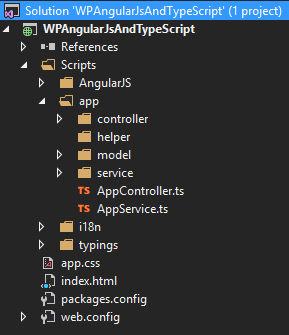
Then create 2 TypeScript file:
- AppController: contains the main Angular module with the declaration of the all the controllers and the page routing if used.
- AppService: contains the Angular module for the all the services with the declaration
Finally remove the app.ts file, we won’t be using it.
For this example we’ll be using a free rest service from the NASA.
Model:
Create a new TypeScript file inside the model folder named NASAImage:
module Model {
    //This class will contain the data returned by the NASA Rest Api
    export class NASAImage{

        id: string;
        date: Date;
        url: string;
        cloud_score: number;

    }

}
Service:
Create a new TypeScript file inside the service folder named NASAService:
module Service { //Define a module in TypeScript (like a namespace in C#)

    //Interface for the result of the rest api
    //The export keyword makes the interface/class accessible (like public in C#/Java)
    export interface ImageResult {

        data: Model.NASAImage;

    }

    export class NASAService {

        //The $http service will be injected automatically by Angular
        constructor(private $http: ng.IHttpService) { //Constructor Syntax

        }

        //Service Method declaration
        GetImage(lat: Number, lon: Number, date: Date): ng.IPromise<{}> { //Return a Promise so I can manage my async above, from the caller

            var url = "https://api.nasa.gov/planetary/earth/imagery?lon=" + lon + "&lat=" + lat + "&date=" + date.getFullYear() + "-" + (date.getMonth() + 1) + "-" + date.getDate() + "&cloud_score=True&api_key=DEMO_KEY"

            return this.$http.get(url);
        }
    }

}
Controller:
Create a new TypeScript file inside the controller folder named MainController:
module Controller {

   //New Public Interface
   //Inherit from the ng.IScope interface of Angular
   //ng is an alias for Angular module
   //It's important to inherit the IScope to be able to add the properties/functions that you want to use
   //because in TypeScript you can't add dynamicaly properties or functions like in JavaScript
    export interface MainControllerScope extends ng.IScope {

        lat: Number;
        lon: Number;
        date: Date;
        GetImage: Function;

        ImageResult: Model.NASAImage;

    }

    export class MainController { //New Public Class

        //The $scope parameter and the NASAService will be injected automatically by Angular like in JavaScript
        constructor(private $scope: MainControllerScope, private NASAService: Service.NASAService) {

        //GetImage function declaration
        $scope.GetImage = () => {

         NASAService.GetImage($scope.lat, $scope.lon, $scope.date).then(function (result: Service.ImageResult) {

           $scope.ImageResult = result.data;
          },
            function (error) {

          });

         };

        }

    }

}
Angular module for Services (AppService.ts):
This file is used to reference all the services of your application and add them to the Service angular module (application).
module Service {

 var app = angular.module("Service", []);

 //Services
 app.service("NASAService", NASAService);

}
Angular module for Controllers (AppController.ts):
This file is used to reference all the controllers of your application and add them to the angular application of you web application.
module Controller {

 //We need to add our Service module as reference so that way we can use the services inside our controller and angular can find the services and inject them where we want.
 var app = angular.module("App", ["Service"]);

 //Controllers
 app.controller("MainController", MainController);

}
View:
Just modify the current index.html file like that:
<!DOCTYPE html>

<html lang="en">
<head>
<meta charset="utf-8" />
<title>TypeScript HTML App</title>

<!-- CSS -->
<link rel="stylesheet" href="app.css" type="text/css" />

<!-- The script order is important, if you don't want to add them all you can use a tool to create a bundle with all your scripts, but be careful they must be in the right order -->

<!-- Scripts -->
<script src="Scripts/AngularJS/angular.js"></script>

<!-- Controllers -->
<script src="Scripts/app/controller/MainController.js"></script>

<!-- Services -->
<script src="Scripts/app/service/NASAService.js"></script>

<!-- App Service -->
<script src="Scripts/app/AppService.js"></script>

<!-- App Controller -->
<script src="Scripts/app/AppController.js"></script>

</head>
<!-- Adding angular app and the controller -->
<body ng-app="App" ng-controller="MainController">

<p>Latitude:</p><input type="number" ng-model="lat" />
<p>Longitude:</p><input type="number" ng-model="lon" />
<p>Date:</p><input type="date" ng-model="date" />

<input type="button" value="Get" ng-click="GetImage()" />
</br>
<img ng-src="{{ImageResult.url}}" />
<p>{{ImageResult.id}} {{ImageResult.date}} {{ImageResult.cloud_score}} {{ImageResult.url}}</p>

</body>
</html>


Reblogged this on Dinesh Ram Kali..
LikeLike
When I build this project, there is an error:
Of course, the same error is present for the longitude variable. I’ve edited MainController.ts to resolve the issue:
export interface MainControllerScope extends ng.IScope {

lat: Number;

lon: Number;
Now my project builds, but the call to GetImage doesn’t seem to be working. I probably mistyped something, and I will recheck my script references in index.html.
I just realized the helper folder was never mentioned after the architecture. Is that something you will talk about in part 3?
LikeLike
Hello,
Thanks for your comment.
The next part is almost done and It will have an example for the helper folder.
But it’s not a part 3, you have enough information here to build nice Web Site or Web Component. It’ll be about page routing.
LikeLike
Oh, Cyril … I’m embarrassed to say that the GetImage function is working just fine. I’m just not patient enough to wait on the network here at work to deliver.
Thank you for this example!
LikeLike
[…] can start this tutorial after AngularJS and TypeScript part 2. We are going to add 2 new pages with 2 controllers and keep the MainController for the […]
LikeLike